|

Port Forwarding Wizard 4.8: This powerful port forwarding software will let you Infinite port forwarding until the destination ip address is achieved. Windows 2000, Windows XP, Vista, Windows 7, Windows 8 are all supported and integrated with http proxy function,let all of your computers share the same internet connection to surfe internet.At the same time,the Pro version can turn non-SSL aware softwares into safely softwares by ssl tunnel technology.
  Open Port Checker: It is a utility you can use to check your external IP address and detect open ports on your connection. This utility is useful for finding out if your port forwarding is setup correctly or if your server applications are being blocked by a firewall or ISP. Learn More » Open Port Checker: It is a utility you can use to check your external IP address and detect open ports on your connection. This utility is useful for finding out if your port forwarding is setup correctly or if your server applications are being blocked by a firewall or ISP. Learn More »
Port forwarding or port triggering allows remote computers (e.g. public machines on the Internet) to connect to a specific computer within a private LAN.
Using this powerful Port Forwarding software,it will let you Infinitely port forwarding until the destination ip address is achieved.It forwards any TCP/UDP protocol. For example: HTTP, SMTP, POP, TELNET, NETBIOS and SSL.You can completely use this tool wihout learning.

When you try to access some remote computer,maybe this computer located in a LAN that you can't directly access or this computer are configed to deny your computer's ip address.
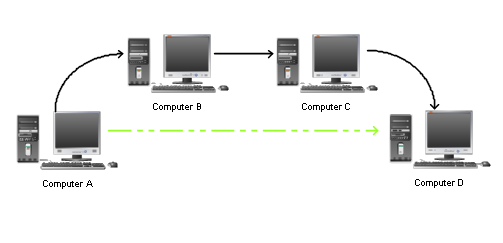
For example,Computer A is your own computer and you want to access some service located on Computer D,you must firstly access Computer B and secondly Computer C.Under this situation,maybe you need to go through a lots of computer to finally access the destination and the computers you must go through maybe run Windows,Solaris or Linux system.It will bother you so much.


Now,you can deploy this Port Forwarding software on those computers,no matter those computers' system.After this,you can directly access your destination easily and enjoy your coffee:)
Sometime you want to access ports on computers behind firewalls, gateways, and inconfigurable routers.
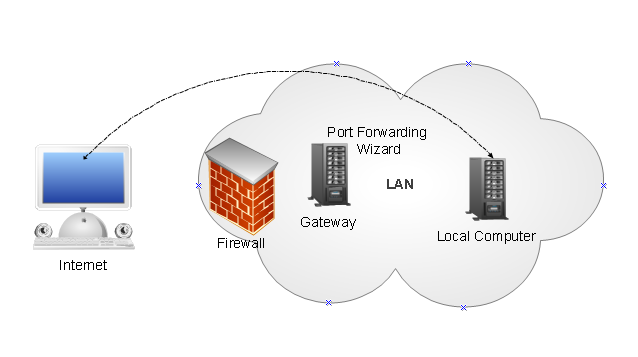
Under this situation,you can not directly access a local computer located in a LAN.But if you deploy Port Forwarding Wizard software on Gateway and set port mapping,then now you can directly access a local computer from internet.Sometime your firewall forbid service on a LAN computer,cause this service listen on a very low port number.Using Port Forwarding Wizard software,you can mapping this low port number to a high port number,then your firwall will not forbid your connecting from outside your LAN.
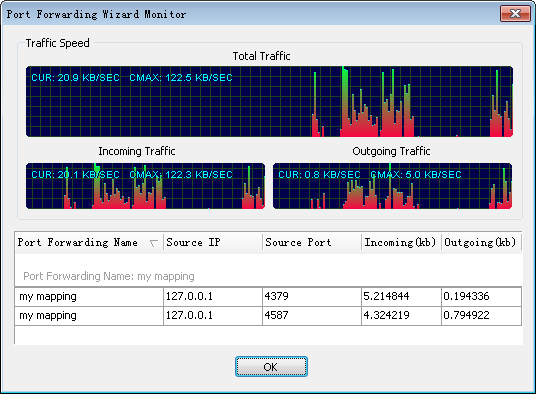
A monitor tool is integrated to let you monitor which ip has connected with Port Forwarding Wizard and how much datas have been forwarding.
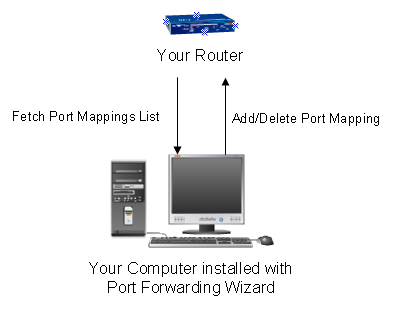
Using the port forwarding software, you can automatically manage port mappings of your router. Port Forwarding Wizard use UPnP technology communicating with your router to view,add or delete port mapping.If you download movie or file from internet using azureus,utorrent or BitComet and want to a very high download speed,you must know how to operate your router to add or delete port mappings.Now using Port Forwarding Wizard software,you can easily to do this!Port forwarding Tester is provided too.This tester
can let you check if your router has opened some ports you want.
Port Forwarding Wizard software integrate http proxy function.When you adding a port mapping,you get an option to choose this port mapping run like a http proxy.This http proxy port forwarding you can choose to directly access internet or connect a upstream http proxy to surfe internet.Then other your computers can share the internet connection with the computer that installed Port Forwarding Wizard.Now your computers can surfe internet at the same time.
All those functions together,Por Forwarding Wizard software is a very powerful port forwarding software.
| 





